
terminal notes: minimal Markdown notes with folders, #tags, [[links]], tabs, live highlighting, a mouse-first TUI — and a headless CLI so scripts and AI agents can work the same vault.
tnotes.app · docs · use with AI agents · compare

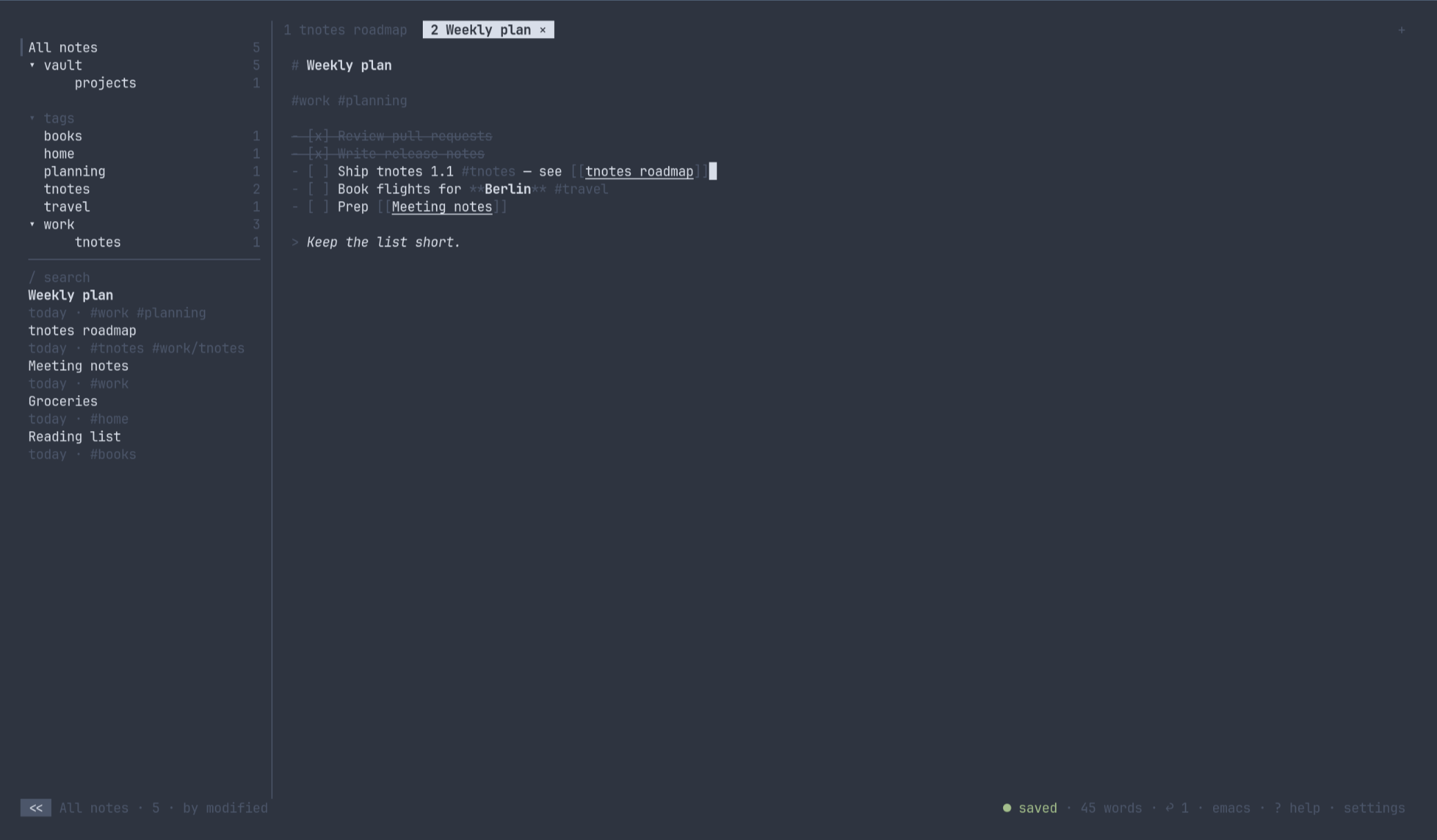
- Plain
.mdfiles on disk: atomic saves, conflict copies instead of silent overwrites, live reload when a file changes outside the app. - Folders are real directories;
#tagsare parsed from the text, including nested ones like#work/project. [[Note title]]links: completion popup,alt+enter/ctrl+clickto follow (a missing target is created), backlinks overlay, and links are rewritten when a note's title changes.- Tabs with a single preview tab: selecting a note previews it, editing or pressing Enter pins it.
- Live Markdown highlighting while you type: headings, lists, checkboxes, code, links, emphasis, quotes, tags.
- List continuation on Enter, Tab / Shift+Tab to nest items, Alt+x or a click to toggle a checkbox.
- Emacs or vim editing keys (powered by edtui).
- Mouse-first: click to select, double-click to pin, right-click context menus, wheel scrolling, drag to select text; a narrow single-panel layout for small terminals.
- Session restore: open tabs, filter, sort, focus and folded sections come back on the next launch.
- In-app settings page (
F2or,) that writes the config file for you. - Colour or monochrome Markdown highlighting; the seven-colour theme follows your terminal palette.
- Headless CLI (
tnotes ls | search | cat | new | append | write | trash | restore,--json) for scripts and agents; a running TUI picks the changes up live.
Homebrew (macOS Apple Silicon/Intel, Linux x86_64/aarch64 — prebuilt, no Rust needed):
brew install 0x1ocean/tnotes/tnotes
brew upgrade tnotes        # later
Cargo (any platform, Rust ≥ 1.98):
cargo install tnotes
cargo install tnotes --force   # upgrade
Prebuilt tarball from a release — targets aarch64-apple-darwin, x86_64-apple-darwin, x86_64-unknown-linux-gnu, x86_64-unknown-linux-musl (static, any distro), aarch64-unknown-linux-gnu; each has a .sha256 next to it:
V=1.3.0; T=aarch64-apple-darwin
curl -sL https://github.com/0x1ocean/tnotes/releases/download/v$V/tnotes-$V-$T.tar.gz | tar xz
install tnotes-$V-$T/tnotes ~/.local/bin/
From source:
cargo install --git https://github.com/0x1ocean/tnotesThe binaries are not signed. On macOS, Homebrew and curl downloads run as-is; a tarball saved through the browser is quarantined by Gatekeeper (xattr -d com.apple.quarantine tnotes clears it). Windows is untested.
tnotes                # open your configured roots
tnotes ~/path         # add the folder to your roots (saved to config) and open it
tnotes --dir ~/path   # use only this folder for the session; config roots are left untouched
Headless subcommands work on the same files (--dir and --json apply to all of them):
tnotes ls [--tag work] [--folder notes/sub] [--limit 20]   # id · title · tags, newest first
tnotes search "milk" [--tag …] [--folder …] [--limit …]    # fuzzy over titles and bodies, best first
tnotes cat weekly-plan                                     # print the note (--json adds text)
tnotes new "Weekly plan" --tag work [--folder …]           # prints the new id; refuses an existing title unless --duplicate
echo "body" | tnotes new "Piped" --stdin                   # body below the title (or whole note without a title)
tnotes append weekly-plan "- [ ] milk"                     # or --stdin
cat new.md | tnotes write weekly-plan --stdin              # replace the text; a new title renames the file and updates [[links]]
tnotes trash weekly-plan                                   # move to the root's .Trash
tnotes restore weekly-plan                                 # and back
tnotes ls --json                                           # id, path, title, folder, tags, links, backlinks, created, modified, preview
A note is addressed by its id (root/sub/stem as printed by ls), a path, or a unique file stem.
The first launch asks where your notes live (default ~/Documents/notes).
The CLI is the agent interface: no daemon, no API — just files and JSON. Point an agent at your vault and let it read, search and write notes while you keep the TUI open; edits show up live in both directions.
tnotes ls --json                                  # every note with tags, links, backlinks, timestamps and a preview
tnotes search "standup" --json | jq '.[0].path'   # best match first
tnotes cat vault/weekly-plan                      # full text
echo "- [ ] follow up with Ann" | tnotes new "Meeting notes" --tag work --stdin
tnotes append meeting-notes "- [ ] send the slides"
The CLI and the TUI can work on the same vault at the same time: a note that is open but clean in the TUI follows a CLI write/append live; a note with unsaved edits in the TUI keeps them and the TUI saves a conflict copy next to it.
Notes reference each other with [[Title]]; links and backlinks in the JSON let an agent walk the graph. A note's id (root/sub/stem) is the same in every command (ls, search, cat, append, write, trash, restore).
The in-app ? page is the source of truth.
| Scope | Action | Keys |
|---|---|---|
| global | new note | ctrl+t |
| global | preview / edit | ctrl+l |
| global | close tab | ctrl+w |
| global | next tab | alt+. · ctrl+x · ctrl+pgdn · alt+→ |
| global | previous tab | alt+, · ctrl+pgup · alt+← |
| global | jump to tab | 1-9 |
| global | sidebar / panel | ctrl+b |
| global | next pane | tab |
| global | previous pane | shift+tab |
| global | settings | F2 |
| global | help | F1 |
| global | quit | ctrl+q · ctrl+c (list/tree: q) |
| list | move | j/k ↑/↓ |
| list | edit (pins the tab) | enter / l |
| list | search | / |
| list | trash (in trash: delete) | d |
| list | undo trash | u |
| list | restore (trash) | r |
| list | move to folder | m |
| list | sort | s |
| list | top / bottom | gg / G |
| list | help / settings | ? , |
| tree | filter | enter |
| tree | fold | space |
| tree | new / rename / delete folder | N / R / D |
| tree | list ← · filter → list | h / l |
| editor | back to list | esc |
| editor | complete tag | #… tab |
| editor | complete link | [[… tab |
| editor | follow [[link]] · backlinks | alt+enter |
| editor | continue list · empty item ends it | enter |
| editor | toggle task (or click the box) | alt+x |
| editor | nest / un-nest list item | tab / shift+tab |
| editor | #tag → filter · [[link]] → open | ctrl+click |
| editor · emacs | find in note | ctrl+s |
| editor · emacs | undo / redo | ctrl+u / ctrl+r |
| editor · emacs | word back / forward | alt+b / alt+f |
| editor · vim | insert | i a I A o O |
| editor · vim | normal · then back to list | esc |
| editor · vim | undo / redo / repeat | u · ctrl+r · . |
| editor · vim | search | / n N |
| mouse | click / double-click | select · pin |
| mouse | right-click | context menu |
| mouse | wheel / drag | scroll · select text (copied on release) |
| mouse | shift+drag | the terminal's own selection, bypassing tnotes |
~/.config/tnotes/config.toml (macOS: ~/Library/Application Support/tnotes/config.toml) — every key with its default (notes_dir = "…" from 0.x is still read when roots is absent):
roots = ["~/Documents/notes"]

[appearance]
compact = false          # one-line list items instead of title + preview
dates = "relative"       # relative | absolute
counts = true            # note counts on the right of tree rows
sidebar_width = 32       # 24..=48
tab_numbers = "always"   # always | multi (only when 2+ tabs)

[editor]
keys = "emacs"           # emacs | vim
autosave_ms = 500        # idle time before a dirty tab is written; 200..=3000
template = "# "          # initial text of a new note; cursor lands at the end of the first line
wrap = true
highlight = "color"      # color (headings/links accent, code, tags) | mono (bold/italic/underline only)
width = 72               # max text column width in cells, 40..=160; 0 = full editor width
align = "left"           # left | center
cursor = "drawn"         # drawn (painted by the editor) | bar | underline | block (terminal cursor)
blink = false

[theme]                  # colour names (cyan, darkgray, #rrggbb, ...); unset keys keep the defaults
accent = "cyan"          # headings, links, open checkboxes, selection
dim = "darkgray"         # markers, quotes, secondary text
warn = "yellow"
err = "red"
ok = "green"
code = "yellow"          # inline and fenced code (highlight = "color")
tag = "green"            # #tags (highlight = "color")
Session state (open tabs, filter, sort, focus) lives in ~/.local/state/tnotes/state.toml.
- One
.mdfile per note; the filename is a slug of the first line (the title), and it is renamed when the title changes. - Folders in the tree are directories on disk. Every root has its own
.Trash/that mirrors the folder layout, so trashed notes can be restored to where they came from. - Dot-prefixed files and directories are ignored.
- Nothing else is written next to your notes, so the folder is safe to sync with git, Syncthing or any file sync.
Notes are plain files, so syncing and encryption are the file system's job; tnotes only needs to behave well underneath.
- Sync: put a root inside a folder synced by Syncthing, iCloud Drive, Dropbox, or keep it in a git repository. Changes from another device show up live (the watcher reloads clean tabs, dirty tabs keep their text). Saves are atomic, so a syncer never sees a half-written note. When the same note is edited on two devices, tnotes never overwrites the other side: it keeps its own text as
name (conflict <time>).md; Syncthing'sname.sync-conflict-*.mdand Dropbox'sname (conflicted copy).mdare listed as ordinary notes so nothing is hidden from you. Dot-prefixed entries (.stfolder,.git,.stversions, iCloud.name.md.icloudplaceholders) are ignored. - Encryption: encrypt the folder, not the notes — FileVault or an encrypted
.dmgon macOS,gocryptfs/fscrypton Linux — and pointrootsat the mounted, decrypted path. Everything (links, search, the CLI) keeps working, and a syncer only ever sees ciphertext.
vendor/edtui is edtui 0.11.7 (MIT, Philipp Reiter) with a word-wrap patch (src/view/line_wrapper.rs, cursor mapping in src/view/internal.rs, scrolling in src/state/view.rs); upstream wraps by character only. It is published as edtui-tnotes so cargo install tnotes works; the workspace builds it from vendor/ via a path dependency.
- Move the
[Unreleased]items inCHANGELOG.mdunder a new## [X.Y.Z] - YYYY-MM-DDheading and bumpversioninCargo.toml(andvendor/edtui/Cargo.tomlif the fork changed). git tag vX.Y.Z && git push origin main vX.Y.Z.
The workflow also regenerates the Homebrew formula (scripts/brew-formula.sh) and pushes it to 0x1ocean/homebrew-tnotes using the HOMEBREW_TAP_TOKEN secret (a fine-grained PAT with contents: write on the tap).
The Release workflow checks that the tag matches Cargo.toml, runs the test suite, attaches Linux and macOS tarballs to a GitHub release whose notes are that changelog section, and publishes edtui-tnotes (when its version is new) and tnotes to crates.io.
MIT — see LICENSE.