
Use biological research tools with your AI agent. BioSymphony combines tool knowledge, scripts, and reusable workflows for sequence search, protein modeling, molecular design, cryo-EM, and experiment design.
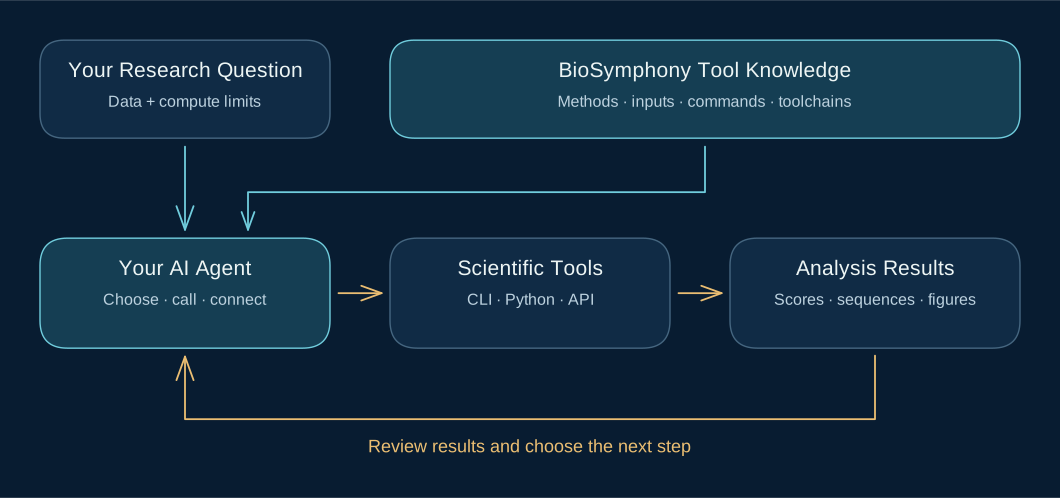
The skills explain which tools fit a question, what inputs they need, how to call them, and how to connect their outputs. You and your agent can use that knowledge to run analyses and decide what to investigate next.
Choose a toolkit · Example toolchains · Get started · Website
BioProspector · Compare Pathways And Find Enzyme Candidates
Explore alternative biosynthetic routes and investigate missing steps. Combine sequence searches, domain annotations, structural neighbors, and reaction references to compare candidate enzymes and route feasibility.
Tool knowledge: DIAMOND, MMseqs2, BLAST+, HMMER, Foldseek, and Rhea.
GeneCluster · Search Genes And Compare Genome Context
Connect sequence search, function annotation, and gene-cluster comparison. Extract matched sequences, join gene identifiers across tools, and compare candidate genes across species. Compare genomic neighborhoods where coordinates are available.
Calling and chaining guide: MMseqs2, HMMER, InterProScan, antiSMASH, plantiSMASH, cblaster, and clinker.
Structure Factory · Compose Protein Design And Prediction Workflows
Choose tools for backbone design, sequence design, complex prediction, scoring, and visualization. Compare methods with consistent inputs and metrics, and connect configured tools through local commands, APIs, or compute providers.
Tool cards: RFdiffusion3, ProteinMPNN, Boltz, Chai-1, and ChimeraX, among other methods.
CryoCore · Work With Cryo-EM Maps And Models
Choose processing and validation methods, assess how models fit experimental maps, compare conformational states, and prepare structural figures. Try the CPU-only review demo before configuring a larger workflow.
Software guide: RELION, CryoSPARC, Phenix, Coot, and ChimeraX workflows and setup requirements.
Small Molecules · Choose Chemistry Tools For Your Task
Match molecular generation, synthesis planning, docking, affinity estimation, and property prediction methods to your inputs. Give your agent the method comparisons, calling references, and setup knowledge it needs to write and run an analysis with the selected tools.
Tool matrix: AiZynthFinder, RDKit, AutoDock Vina, GNINA, and other chemistry tools.
Ferm DoE · Generate Designs And Choose The Next Experiment Batch
Generate fermentation experiment designs, analyze supplied results, and select follow-up batches under factor, cost, and run-count constraints. Compare scale-transfer assumptions and use optional optimization backends when needed.
Commands
and backends:
ferm-doe, SciPy, BoFire, ENTMOOT, and BoTorch.
A useful toolchain passes the right data to the next method. Your agent extracts sequences, converts file formats, matches identifiers, and checks outputs between calls. These examples show tool combinations and command sequences documented by the toolkits.
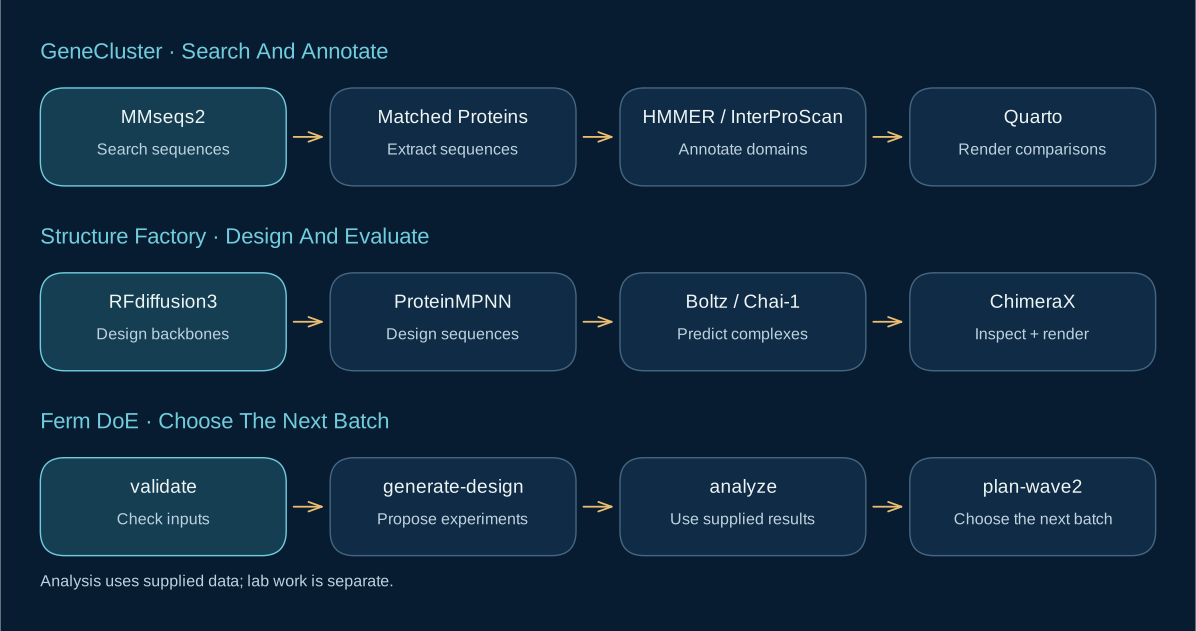
The toolkits include runnable helpers and reference workflows. Scientific tools, models, and databases have their own installation requirements; the linked guides distinguish available integrations from methods that need adaptation.
Open a toolkit in Codex, Claude Code, or another agent that can read files and call tools. The agent uses your existing shell, Python environment, APIs, or configured compute. You can also run the supplied command-line tools directly.
Start with a small analysis:
Read this toolkit's skill and tool guides. My goal is [question], using [inputs]. Choose a toolchain and check its dependencies. Run a small local example, inspect the outputs, and use those results to suggest the next analysis. Explain which commands ran and which tools still need setup.
- Proteus automates structure lookup, PyMOL and ChimeraX analysis, and molecular figures.
- BioVoice lets you control PyMOL and ChimeraX by voice.
- NeoCloud Bridge runs approved workloads on cloud providers and returns outputs to your workspace.
Useful contributions include tool integrations, calling examples, analysis recipes, and fixes to the tool guides. Open an issue or pull request in the relevant repository, using public or synthetic data for shared examples.
