


Ever spent 10 minutes looking for that one document you know you saved somewhere? Yeah, we've all been there. That's why we built Foundit.
Instead of remembering exact file names, just ask naturally: "find my resume" or "where's my passport?" The AI actually understands what you're looking for and finds it. Pretty neat, right?
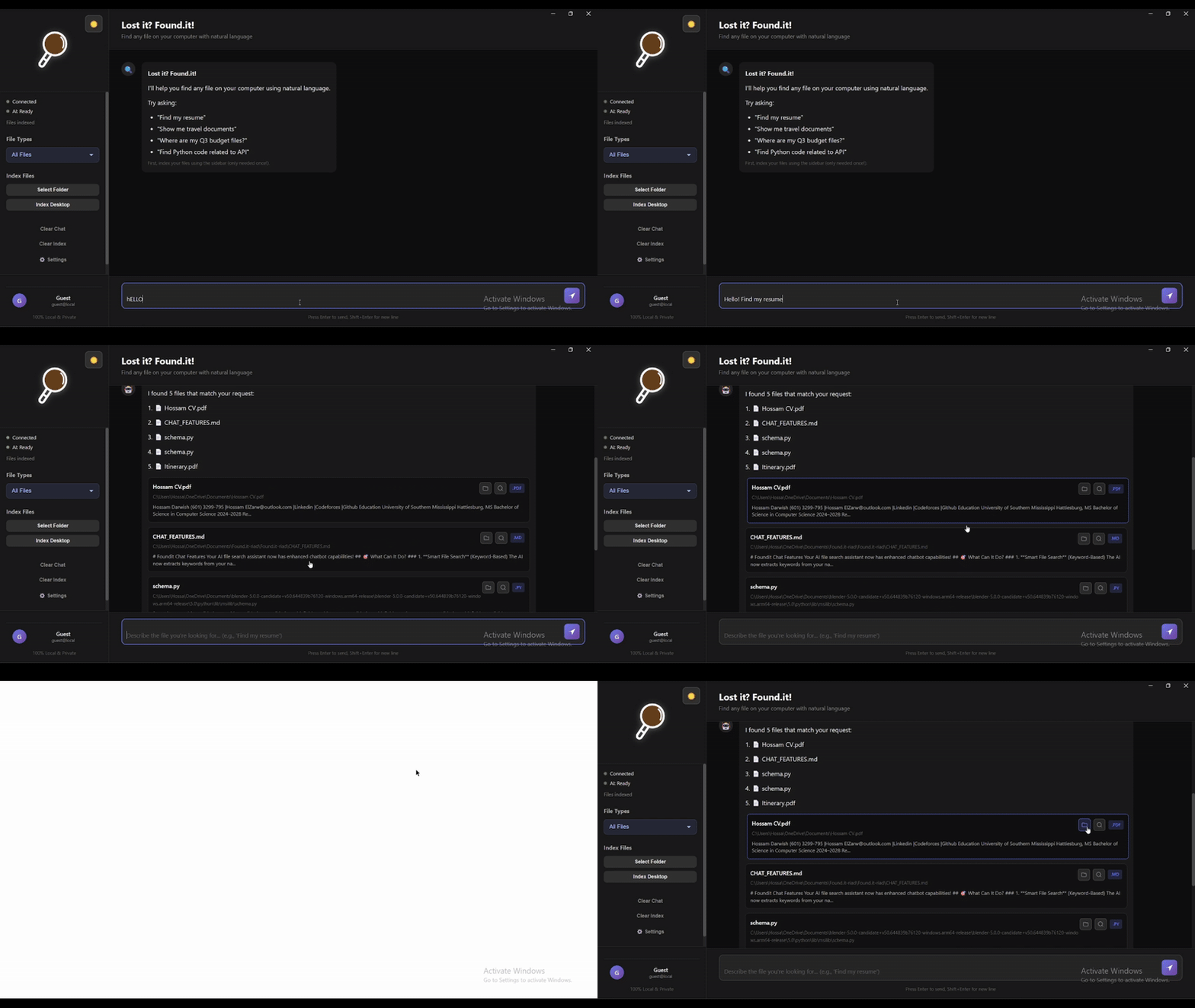
- Talk Like a Human - No more keyword hunting. Just ask "show me my tax stuff from 2023" and it gets it.
- Actually Smart - Knows that "resume" and "CV" are the same thing. Finds your passport when you ask for "travel documents."
- Lightning Fast - Results in under 100ms. No waiting around.
- Private Search - Indexing and search run entirely on your computer, so your files are never uploaded to be searched.
- Ridiculously Easy - If you can chat with ChatGPT, you can use Foundit.
Just three things:
- Python 3.8 or newer (grab it here)
- Node.js 16 or newer (get it here)
- 5 minutes of your time
If you know Git:
git clone https://github.com/UnknownHacker1/Found.it.git
cd Found.it
If you don't: Just download the ZIP file from GitHub, extract it, and open a terminal in that folder.
Then install the dependencies:
# Install Python stuff
cd backend
pip install -r requirements.txt
cd ..

# Install Node stuff
cd frontend
npm install
cd ..
That's it! The AI model (about 80MB) downloads automatically the first time you run it.
You need two terminal windows:
Terminal 1 - The Brain (Backend):
cd backend
python app.py
Wait until you see "Server ready!" - that means it's good to go.
Terminal 2 - The Face (Frontend):
cd frontend
npm start
The app window pops up and you're ready to search!
I get it. Here's a quick shortcut:
Windows: Create start-foundit.bat:
@echo off
start cmd /k "cd backend && python app.py"
timeout /t 5
cd frontend
npm start
Just double-click it next time.
Mac/Linux: Create start-foundit.sh:
#!/bin/bash
cd backend && python3 app.py &
sleep 5
cd frontend && npm start
Then: chmod +x start-foundit.sh && ./start-foundit.sh
The app needs to know what files you have:
- Click "Quick Index Desktop" - scans your Desktop folder
- Or "Select Folder to Index" - pick any folder you want
It'll chug through your files and build a search index. Depending on how many files you have, this takes a minute or two.
Just type what you're looking for like you're texting a friend:
- "find my resume"
- "show me python code"
- "where's my passport?"
- "tax documents from 2023"
- "that budget spreadsheet"
Hit Enter. Boom. Results.
This is where it gets fun:
You: find my passport
Foundit: Found it! 📄 Passport_2024.pdf

You: what's the expiration date?
Foundit: *reads the file* Your passport expires on June 15, 2034.
Yeah, it actually reads and understands your files.
Here's what people actually search for:
| What You Type | What It Finds |
|---|---|
| "my cv" | Resume_2024.pdf, Professional_CV.docx, Work_History.pdf |
| "python projects" | All your .py files, Jupyter notebooks, Python scripts |
| "important travel stuff" | Passport, visas, boarding passes, hotel bookings |
| "tax things" | W2 forms, 1040s, tax returns, receipts |
| "that presentation from last week" | Recent .pptx files, slide decks |
The AI connects the dots. You don't have to remember exact filenames.
Pretty much everything with text:
- Documents - PDF, Word, PowerPoint, text files, Markdown
- Code - Python, JavaScript, Java, C++, Go, Rust, you name it
- Data - JSON, CSV, XML, YAML
- Basically - If you can open it in a text editor, Foundit can search it
Error: Something breaks when you run python app.py
Try this:
python --version  # Make sure it's 3.8 or higher
pip install --upgrade pip
pip install -r requirements.txtThe Problem: Frontend can't talk to backend
The Fix:
- Make sure the backend terminal is still running
- Look for "Server ready!" in the backend terminal
- Restart both if needed
- Check if something else is using port 8000
Why: Usually means files aren't indexed yet
Solution:
- Click "Quick Index Desktop" first
- Try different search terms
- Make sure your files have actual text (not just scanned images)
This is normal if:
- You're indexing 1000+ files
- You have large PDFs
- You're indexing network drives
Speed it up:
- Start with smaller folders
- Close other programs
- PDFs with just images can't be searched anyway (no text to extract)
Built with:
- Electron - The app wrapper
- Python FastAPI - The backend server
- Sentence Transformers - The AI that understands meaning
- FAISS - Crazy fast vector search (thanks Facebook)
- OpenRouter or Ollama - For the conversational AI part (OpenRouter by default, or a local Ollama model if you want everything offline)
- CUDA (through CuPy) - Optional GPU search on NVIDIA cards (see below)
It's basically ChatGPT + Google, but just for your files.
If your computer has an NVIDIA graphics card, Foundit can run the search on it.
Foundit finds files with an exact similarity search across every file's embedding (FAISS IndexFlatIP). FAISS has no GPU build for Windows, so the GPU path is a small CUDA C++ kernel of its own in backend/gpu_search.py. CuPy compiles it on the fly with NVIDIA's NVRTC, so you only need the normal NVIDIA driver, not the CUDA toolkit.
How it gets its speed:
- Search is limited by memory, not math. Every query has to read the whole table of embeddings once, so the table lives on the GPU in fp16, half the bytes of fp32. The kernel still adds everything up in fp32.
- Each group of 16 GPU threads reads one row with 16-byte loads, so every read is fully coalesced.
- Up to 8 queries share one pass over memory.
Numbers on a laptop GTX 1650 (4 GB) against FAISS on the same laptop's 8-thread Intel i5-11320H, 384-dimension embeddings, top 30:
| Files (vectors) | FAISS on the CPU | Foundit on the GPU | Speedup |
|---|---|---|---|
| 100,000 | 5.47 ms | 0.84 ms | 6.5x |
| 1,000,000 | 50.87 ms | 5.63 ms | 9.0x |
At 1M vectors the kernel reads memory at 175 GB/s, 91% of the card's 192 GB/s peak, and returns the same top 30 as FAISS (recall 1.0). With batches of 8 queries it's 17x faster than FAISS per query. For comparison, the fastest plain PyTorch version took 9.15 ms per query on the same GPU. Full results are in benchmarks/results.json.
To turn it on:
pip install torch --index-url https://download.pytorch.org/whl/cu126
pip install -r backend/requirements-gpu.txt
Foundit uses the GPU automatically when it finds one and falls back to FAISS when it doesn't. Set FOUNDIT_GPU=0 to force the CPU. To check it on your machine, run python backend/test_gpu_search.py (results match FAISS) and python benchmarks/gpu_search_bench.py (speed).
Found a bug? Have an idea? Here's how to contribute:
- Fork the repo
- Make your changes
- Test it
- Send a pull request
Or just open an issue and tell me what's broken or what you want.
Stuff I'm working on:
- Auto-detect new files (so you don't have to re-index)
- Search filters (date, file type, size)
- OCR for scanned PDFs
- Search history
- Even faster search
- Maybe a mobile app?
Your files are yours. Indexing and search happen entirely on your computer, so nothing gets uploaded to be searched. The chat and summary features do send the relevant text to an LLM: OpenRouter by default, or a local Ollama model if you'd rather keep everything offline. We built this because we were tired of cloud services indexing our personal documents. Your privacy matters.
Foundit was a finalist at USM's Hatchathon in November 2025. We built it together as a team of three: Abdelrahman Teima, Hossam Darwish and Riad Benyamna. Most of it was written side by side on one shared laptop, which is why most of the commits come from one account.
MIT License - do whatever you want with it.
- Found a bug? Open an issue
- Have a question? Start a discussion
- Want to chat? Email me or find me on Twitter
Made by three people who were tired of losing files. Hope it helps you too.