





Key Features • Requirements • Installation • Usage • Start with Linux • Configuration • Building From Source • Uninstallation • Packages Used • Feedback • About This Fork • License
- Linux Native - Designed specifically for Linux instead of relying on Windows APIs.
- Wine/Proton FL Studio Detection - Detects FL Studio running through Wine, Proton, and similar compatibility layers.
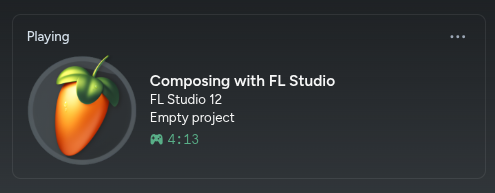
- Discord Rich Presence - Displays your current FL Studio activity on Discord.
- System Tray Integration - Runs quietly in the background with a tray icon.
- Start with Linux - Supports automatic startup through the standard Linux XDG Autostart system.
- Secret Mode - Hide your FL Studio project name from your Discord activity.
- Conditional RPC - Discord activity is only displayed while FL Studio is running.
- Single Instance - Prevents multiple copies of FL Studio Discord RPC from running simultaneously.
- Accurate FL Studio Version Detection - Displays the detected FL Studio version when available.
- JSON Configuration - Settings are stored in an easy-to-manage configuration file.
- Lightweight - Runs in the background with minimal resource usage.
- Self-Contained Releases - Official releases include everything required to run the application without installing the .NET runtime separately.
Currently supported:
- Linux x86-64
- FL Studio running through Wine, Proton, or another compatible Wine environment
- Discord, including the official Flathub
com.discordapp.Discordpackage
The application is currently distributed as a Linux x86-64 build.
Official releases are published as self-contained .NET 8 applications, so installing the .NET runtime separately is not required.
For building from source, you will need:
- .NET 8 SDK
- GNU Make
- Git
- A Linux system supported by the .NET runtime and the native GTK/libadwaita dependencies used by the application
Official pre-built releases currently target Linux x86-64. Other architectures may be buildable from source, but are not officially tested.
A desktop environment or compatible graphical session is recommended for:
- Application menu integration
- System tray support
- XDG autostart support
System tray behavior may vary depending on your desktop environment, panel, or status notifier implementation.
Official releases are distributed as native Linux packages instead of a custom setup.sh installer.
Download the package for your distribution from the Releases page.
Tip
The native packages are the recommended installation method. If none of the provided package formats fit your distribution or you need a custom build, you can compile FL Studio Linux RPC directly from source. See Building From Source or BUILDING.md.
sudo apt install ./flstudiorpc_X.X.X_amd64.debsudo dnf install ./flstudiorpc-X.X.X-1.x86_64.rpmsudo pacman -U ./flstudiorpc-X.X.X-1-x86_64.pkg.tar.zstThe package manager installs and owns:
/usr/bin/flstudiorpc/usr/share/applications/flstudiorpc.desktop- FL Studio RPC icons under
/usr/share/icons/hicolor/ - The packaged license file
Required GTK4/libadwaita and X11/XWayland inspection dependencies are declared by the package for each supported package format. This includes both xwininfo and xprop, which are used to identify FL Studio and its focused child windows safely.
After installation, FL Studio Discord RPC should appear in your application menu. You can also launch it directly with:
flstudiorpcInstalling one of the new distro packages automatically removes the legacy /opt/flstudio-rpc application directory. Existing Start with Linux entries that still reference the old /opt executable are migrated by the application the next time it starts.
Older versions of setup.sh also copied the project's custom Icons/hicolor/index.theme over the distro-owned hicolor theme file. The new packages never own or replace that file. If package installation prints a warning about the legacy hicolor theme, restore it once with your distro package manager:
# Debian / Ubuntu / Linux Mint
sudo apt install --reinstall hicolor-icon-theme

# Fedora
sudo dnf reinstall hicolor-icon-theme

# Arch Linux / CachyOS / EndeavourOS
sudo pacman -S hicolor-icon-themeOnce started, FL Studio Discord RPC runs in the background and monitors your system for FL Studio.
When FL Studio is detected, the application updates your Discord Rich Presence with information about the current FL Studio session.
When FL Studio is closed, the Discord activity is cleared automatically.
The RPC connection supports both ordinary host installations of Discord and the official Flathub package:
com.discordapp.Discord
For Flatpak Discord, the application checks the host-visible IPC bridge under:
$XDG_RUNTIME_DIR/app/com.discordapp.Discord/discord-ipc-*
Discord must be running before the Rich Presence connection can be established. If Discord starts later or restarts, FL Studio Linux RPC keeps retrying the connection automatically.
The application provides a system tray icon when supported by your desktop environment or panel.
Right-click the tray icon to access the available options, including:
- Secret Mode - Hide your current project name
- Start with Linux - Launch FL Studio Discord RPC automatically when your graphical session starts
- About - Open information about the application
- Exit - Close FL Studio Discord RPC
System tray support depends on your desktop environment or status notifier implementation.
The Start with Linux option uses the standard Linux XDG Autostart system.
When enabled, FL Studio Discord RPC creates an XDG .desktop autostart entry for the installed application.
The entry points to:
/usr/bin/flstudiorpc
The autostart directory follows XDG_CONFIG_HOME.
If XDG_CONFIG_HOME is set, the entry is stored under:
$XDG_CONFIG_HOME/autostart/
Otherwise, the default location is:
~/.config/autostart/
Most full Linux desktop environments process XDG autostart entries automatically.
This generally includes:
- GNOME
- Cinnamon
- KDE Plasma
- XFCE
- MATE
- LXQt
In these environments, enabling Start with Linux should normally be enough for FL Studio Discord RPC to launch automatically after login.
Standalone window managers and Wayland compositors may not process XDG autostart entries by themselves.
For example, a plain Hyprland session does not necessarily provide the same XDG autostart handling as a full desktop environment.
For Hyprland users, running the session through UWSM is recommended if you want standard XDG autostart applications to launch automatically.
For example, a UWSM-managed Hyprland session may be started using:
uwsm start hyprland.desktopor through a display manager using the Hyprland (uwsm-managed) session when available.
Note
Enabling Start with Linux creates and manages the XDG autostart entry.
Your desktop environment or graphical session is responsible for actually processing that entry and launching the application when you log in.
If Start with Linux is enabled but FL Studio Discord RPC does not launch automatically, verify that your current graphical session supports XDG autostart.
Configuration is stored as JSON and can be customized without modifying the application itself.
The configuration controls application behavior such as Discord Rich Presence settings, privacy options, and other application preferences.
Note
The exact configuration location and available options may change as the Linux port develops.
If you are building from source, check the current configuration implementation in Config/Config.cs.
Remove the application through the same package manager used to install it.
sudo apt remove flstudiorpcsudo dnf remove flstudiorpcsudo pacman -Rns flstudiorpcThe package manager removes the installed executable, application-menu entry, icons, and other package-owned files automatically.
Per-user configuration and preferences under ~/.config are intentionally preserved. If Start with Linux was enabled, its user-owned XDG autostart entry may remain, but it contains TryExec=/usr/bin/flstudiorpc, so desktop environments will ignore it once the package is removed. Disable Start with Linux before uninstalling if you also want that user file removed automatically by the application.
Official .deb, .rpm, and .pkg.tar.zst packages are the recommended installation method.
If your distribution is not covered by those packages, you want to test unreleased changes, or you need a custom build, the project can also be compiled directly from source.
For more detailed build information, see BUILDING.md.
You will need:
- .NET 8 SDK
- GNU Make
- Git
- The native GTK/libadwaita libraries required by the application
xwininfoandxprop
Exact package names vary between distributions.
Clone the repository:
git clone https://github.com/devrainz/FLStudio-Linux-RPC.git
cd FLStudio-Linux-RPCThe repository includes a Makefile so the common development and publishing commands are easier to reproduce.
Build the project:
makeor explicitly:
make buildRun through the .NET CLI while developing:
dotnet runTo create a standalone Linux x86-64 build:
make publishThe resulting executable is placed under:
build/publish/linux-x64/FLStudioRPC
Run it directly with:
./build/publish/linux-x64/FLStudioRPCYou can select another .NET runtime identifier when needed:
make publish RID=linux-arm64Note
Official releases are currently tested and distributed for Linux x86-64. Other runtime identifiers may build successfully, but are not officially supported unless explicitly stated.
make
make build
make restore
make publish
make package VERSION=X.Y.Z
make clean
make help
make package VERSION=X.Y.Z uses the same native packaging script as GitHub Actions and creates the supported Debian, RPM, and Arch Linux package formats.
Packaging is handled by nFPM using packaging/nfpm.yaml. Both GitHub Actions workflows call the same packaging/build-packages.sh script, so local package builds and release builds use the same logic.
The Build Linux Packages workflow publishes three x86-64 package formats from the same self-contained .NET build:
flstudiorpc_X.X.X_amd64.deb
flstudiorpc-X.X.X-1.x86_64.rpm
flstudiorpc-X.X.X-1-x86_64.pkg.tar.zst
SHA256SUMS
You can run it manually through:
GitHub → Actions → Build Linux Packages → Run workflow
The Create Linux Release workflow calculates the next semantic version, builds the same three packages, generates release notes, and publishes them in a GitHub Release.
No setup.sh or uninstall.sh is included. Installation, upgrades, file ownership, and removal are handled by apt/dpkg, dnf/RPM, or pacman.
FLStudio-Linux-RPC/
├── Config/
│   └── Config.cs
├── Events/
│   └── Events.cs
├── Icons/
│   └── hicolor/
├── Memory/
│   └── Utils.cs
├── Tray/
│   └── LinuxTray.cs
├── packaging/
│   ├── build-packages.sh
│   ├── flstudiorpc.desktop
│   ├── nfpm.yaml
│   └── scripts/
│       ├── postinstall.sh
│       └── postremove.sh
├── .github/
│   └── workflows/
│       ├── build-packages.yml
│       └── release.yml
├── BUILDING.md
├── Makefile
├── FLStudioRPC.csproj
├── Program.cs
└── README.md
DiscordRichPresence - Discord Rich Presence library.
Newtonsoft.Json - JSON serialization and configuration handling.
Colorful.Console - Console output formatting.
Tmds.DBus - D-Bus integration for Linux desktop functionality.
Tmds.DBus.Protocol - D-Bus protocol support.
SixLabors.ImageSharp - Image processing used by the Linux application and tray integration.
If you encounter a bug, have a feature request, or experience an issue with FL Studio running through Wine or Proton, please open an issue on the GitHub repository.
When reporting an issue, including information such as your:
- Linux distribution
- Desktop environment or window manager
- Wine or Proton version
- FL Studio version
- Discord installation type
can make troubleshooting easier.
Feedback and contributions are welcome.
FL Studio Discord RPC for Linux is a Linux-focused fork and substantial port of the original FL Studio Discord RPC by @zfi2.
The original project provided the foundation for this Linux version, and portions of its original code and overall functionality were retained where appropriate.
However, the original application was heavily dependent on Windows-specific APIs and technologies, making a direct Linux port impractical.
Because of this, a significant portion of the application had to be rewritten and replaced with Linux-native implementations.
Windows-specific functionality was removed or replaced with Linux-compatible approaches for areas such as:
- FL Studio process detection
- Wine and Proton detection
- Discord Rich Presence integration
- System tray integration
- Application and desktop integration
- XDG autostart integration
- Configuration and application behavior
- Single-instance handling
- Linux application icons and desktop entries
- Installation and uninstallation
- Other functionality that previously depended on Windows APIs
The goal of this project is therefore not simply to run the original Windows application on Linux, but to provide a proper Linux-native implementation while preserving the core idea and functionality of the original project.
Huge thanks to @zfi2 for creating the original FL Studio Discord RPC and providing the foundation that made this project possible.
Original project:
https://github.com/zfi2/FL-Studio-Discord-RPC
This project is independently maintained and focused exclusively on Linux.
This project is licensed under the MIT License - see the LICENSE file for details.
GitHub @devrainz