




A spreadsheet-like table widget for tkinter, wrapping the Tcl/Tk Tktable extension.
⚠️ Important: pytktable is only the Python wrapper. The table widget itself is Tktable, an extension for Tcl/Tk written in C, whichpip install pytktabledoes not install. Install it with pytktable, prebuilt for Linux, macOS and Windows, withpip install "pytktable[binary]", or install it yourself following the installation instructions for your OS. Then runpython -m tktableto check that it works.
The wrapper was originally written by Guilherme Polo.
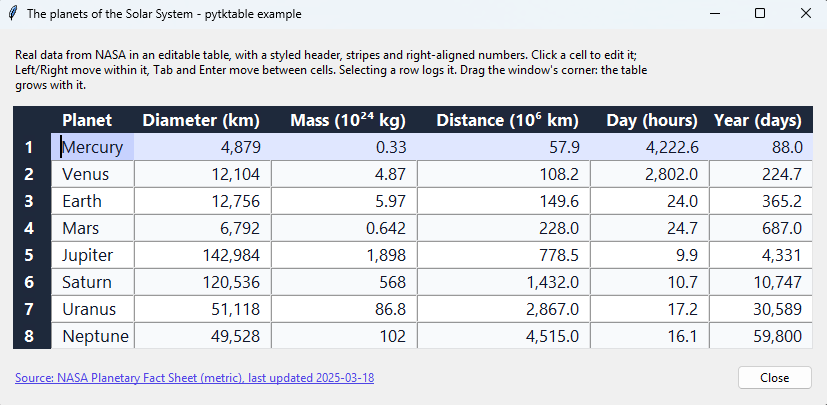
The example above shows the planets of the Solar System, from NASA's Planetary Fact Sheet (screenshot taken on Windows 11).
- Spreadsheet-like tables with title rows and columns, editable cells, and keyboard navigation.
- Cell values kept in an
ArrayVar(a Tcl array), or computed on demand by a callback. - Styling with tags: colors, fonts, alignment and relief, for single cells, rows or columns.
- Merged cells (spans), embedded widgets, and resizable rows and columns.
- Cells that flash when their value changes, with a color of your choice.
- Selection of cells, rows or columns; inserting and deleting rows and columns.
- Callbacks when the active cell changes, to compute cell values, to validate edits, and to format the selection when it is copied.
- Works on Linux, macOS and Windows, with Python 3.11 or later and Tcl/Tk 8.6 or 9.0, once Tcl/Tk (usually bundled with Python) and the Tktable extension are installed.
python -m tktablechecks that Tktable can be found and loaded.
With Tktable, prebuilt for Linux, macOS and Windows (pytktable-binaries):
pip install "pytktable[binary]"Without Tktable, if you install it yourself (see Installation):
pip install pytktableIt is imported as tktable (from tktable import Table). Run python -m tktable to check that
Tktable can be found and loaded.
https://nbro.github.io/tktable/: usage, API reference, development and releasing.
Copyright (c) 2008, Guilherme Polo
Copyright (c) 2016-2026, nbro
See the changelog for what changed in this fork.