

(UPDATE: this all relies on the coingecko free api, and a full OS. If you just want to look at bitcoin prices, we have much simpler devices that involve minimal setup at dirtboy.industries) if you prefer tinkering and/or non BTC stuff, read on...
An ePaper Cryptocurrency price ticker that runs as a Python script on a Raspberry Pi connected to a Waveshare 2.7 inch monochrome ePaper display. The script periodically (every 5 mins by default) takes data from CoinGecko and prints a summary to the ePaper. You can specify the exchange used for price info, as well as the currencies that your chosen coin's prices are in.
A few minutes work gives you a desk ornament that will tastefully and unobtrusively monitor a coin's journey moonward.
(supports all coins/currencies/exchanges listed on CoinGecko)
These instructions work on both older Raspberry Pi OS releases (such as Bullseye) and newer ones (Bookworm, Trixie and later). Newer releases require Python packages installed with pip to live in a virtual environment, so the instructions use one on every version. They assume your Raspberry Pi is already connected to the Internet.
If you are using an original Pi Zero or Zero W, use the 32-bit Raspberry Pi OS Lite image (these boards cannot run the 64-bit version). A Zero 2 W can run either, and Lite is still recommended given the 512MB of RAM.
The script is set up to work for the V1 Waveshare 2.7in ePaper. If you are using V2 then see the note in btcticker.py about switching to V2.
If you are running the Pi headless, connect to your Raspberry Pi using ssh.
Connect to your ticker over ssh and update and install necessary packages
sudo apt-get update
sudo apt-get install -y git python3-venv
sudo apt-get install -y python3-pil python3-numpy python3-matplotlib python3-spidev python3-gpiozero
sudo apt-get install -y python3-requests python3-babel python3-yaml
Enable spi (0=on 1=off)
sudo raspi-config nonint do_spi 0
Now clone the required software (Waveshare libraries and this script)
cd ~
git clone https://github.com/waveshare/e-Paper
git clone https://github.com/veebch/btcticker.git
Move to the btcticker directory, copy the example config to config.yaml and move the required part of the waveshare directory to the btcticker directory
cd ~/btcticker
cp config_example.yaml config.yaml
cp -r ~/e-Paper/RaspberryPi_JetsonNano/python/lib/waveshare_epd .
rm -rf ~/e-Paper
Create a virtual environment inside the btcticker directory. The --system-site-packages option lets it use the Python packages you just installed with apt (numpy, matplotlib, Pillow, requests, Babel, PyYAML, SPI and GPIO libraries), so pip only needs to install the one module that is not packaged for apt.
python3 -m venv --system-site-packages .venv
Install the required Python3 modules into the virtual environment
.venv/bin/pip install -r requirements.txt
You do not need to activate the virtual environment. Running .venv/bin/python uses it automatically. To test the ticker by hand:
.venv/bin/python btcticker.py
The command below fills in your own user name and home directory automatically, so it works whatever your user is called.
cat <<EOF | sudo tee /etc/systemd/system/btcticker.service
[Unit]
Description=btcticker
Wants=network-online.target
After=network-online.target

[Service]
ExecStart=$HOME/btcticker/.venv/bin/python -u $HOME/btcticker/btcticker.py
WorkingDirectory=$HOME/btcticker/
StandardOutput=inherit
StandardError=inherit
Restart=always
User=$USER

[Install]
WantedBy=multi-user.target
EOF
Now enable and start the service you just made
sudo systemctl daemon-reload
sudo systemctl enable --now btcticker.service
To check it is running, or to see any errors:
systemctl status btcticker.service
journalctl -u btcticker.service -f
This only applies if you are going to control configuration via the buttons on the board.
The ePaper is slow. There is a lag of a few seconds between button press and a change to the display.
Here's what each of the buttons do:
- Button 1: Cycle through the cryptocurrencies listed in config.yaml
- Button 2: Rotate Display -90 degrees
- Button 3: Invert Display
- Button 4: Cycle through the fiat currencies listed in config.yaml
Update frequency can be changed in the configuration file (default is 300 seconds).
The file config.yaml (the copy of config_example.yaml you made earlier) contains a number of options that can be tweaked:
display:
  cycle: true # Setting to true makes the ticker cycle through a list of coins
  cyclefiat: true # Setting to true makes fiat cycle too, so you can do multiple pairs
  inverted: false # true for black text on grey, false for grey text
  orientation: 90 # 90 for horizontal display, buttons on left
  trendingmode: false # Add trending coins to those being displayed
  showvolume: false # Show volume (in fiat currency)
  showrank: false # Show ranking (by volume)
  24h: true # true for 24h clock, false for 12h
  locale: en_US # For region specific changes to price formatting
ticker:
  currency: bitcoin,ethereum,cardano # symbols used on coingecko
  exchange: default # specific exchanges can be specified
  fiatcurrency: usd,btc,gbp # 'fiat' currency
  sparklinedays: 1 # Time period shown on sparkline graph
  updatefrequency: 300 # How often price is refreshed (seconds) (lower limit 60s)
After changing config.yaml, restart the service to pick up the changes:
sudo systemctl restart btcticker.service
- cycle: switch the display between the listed currencies if set to true, display only the first on the list if set to false
- cyclefiat: cycle listed fiat currencies, display only the first on the list if set to false
- inverted: Black text on grey background if false. Grey text on black background if true
- orientation: Screen rotation in degrees , can take values 0,90,180,270
- trendingmode: If true, it checks the 7 coins that coingecko lists as trending and also displays them (names are included in display)
- showvolume, showrank: true to include in display, false to omit
- currency: the coin(s) you would like to display (must be the coingecko id)
- exchange: default means use coingecko price, it can also be set to a specific exchange name such as gdax (coinbase), binance or kraken (full list on coingecko api page)
- fiatcurrency: if cyclefiat is set to True, it will also cycle, otherwise it will use only the first entry (and cycle with button presses)
- sparklinedays: Number of days of historical data appearing on chart
- updatefrequency: (in seconds), how often to refresh the display
When you activate trending mode (by setting to true in the config file, in addition to your coins, the ticker will cycle through 7 coins that are currently listing as trending on CoinGecko (see photo below).

To contribute, please fork the repository and use a feature branch. Pull requests are welcome.
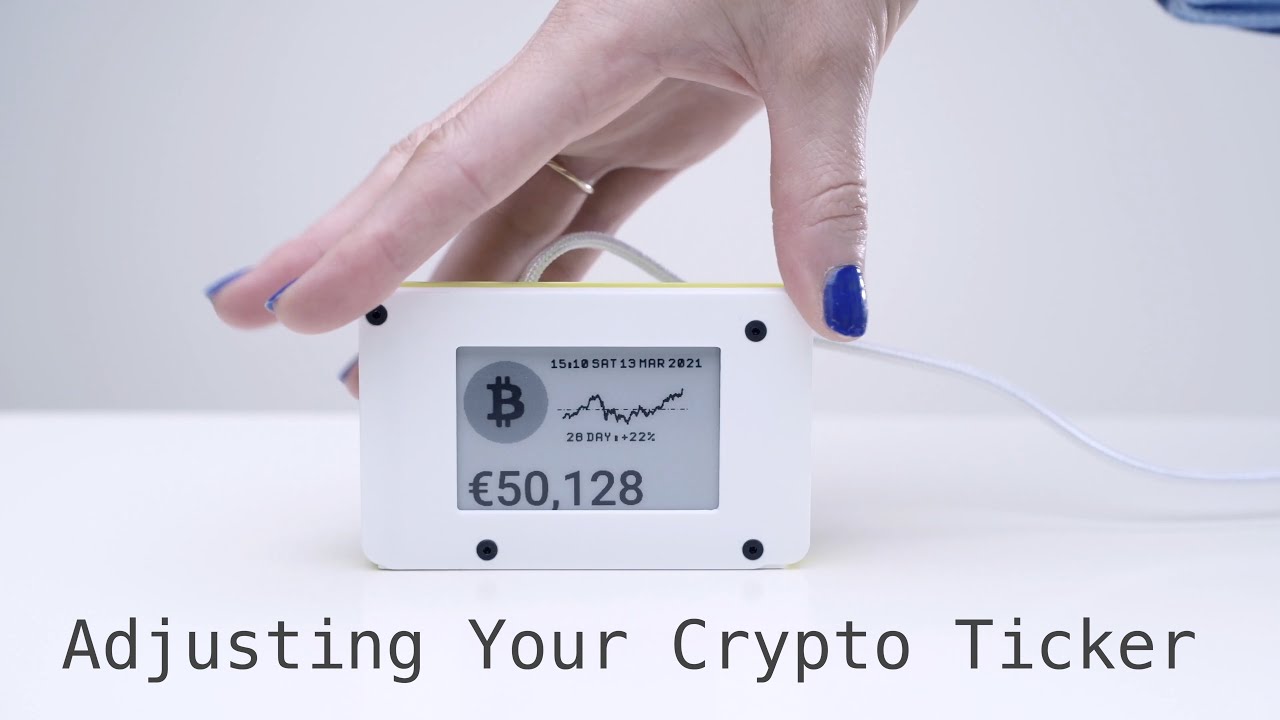
- Video of the unit working here
GNU GENERAL PUBLIC LICENSE Version 3.0