Repository navigation
Home
On this page
GPTQModel is an extensible platform for LLM quantization, calibration, validation, and deployment across diverse hardware accelerators. This wiki is the full documentation site: it covers the concepts behind quantization, every supported quantization method, the complete QuantizeConfig surface, the quantize→save→load→inference lifecycle, every inference kernel backend, and the internals needed to extend the project.
New here? Read What is Quantization? for the concepts (W4A16, group size, symmetric vs asymmetric), then Installation and Quickstart for a runnable end-to-end workflow.
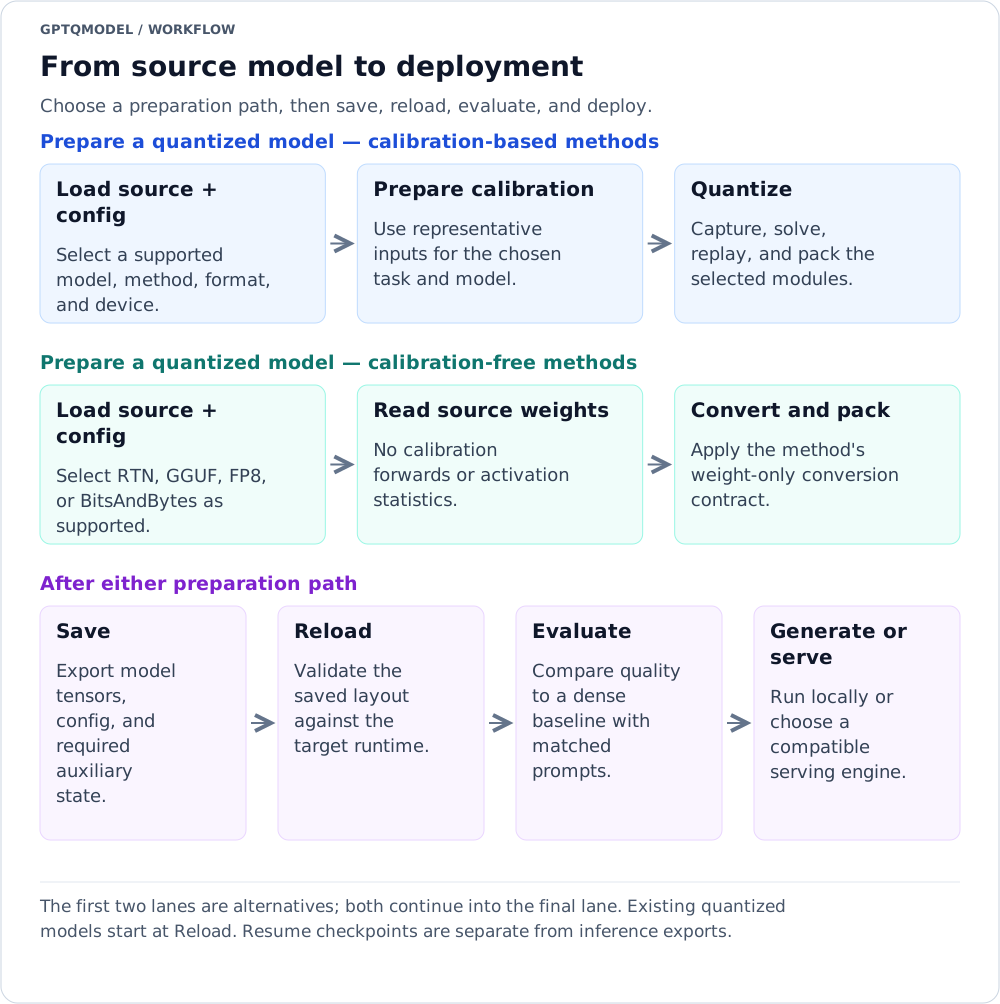
Reading the diagram: The first two lanes are alternatives; both continue into the final lane. Existing quantized models start at Reload. Resume checkpoints are separate from inference exports.
Text version of the workflow
- Prepare a quantized model — calibration-based methods: Load source + config → Prepare calibration → Quantize.
- Prepare a quantized model — calibration-free methods: Load source + config → Read source weights → Convert and pack.
- After either preparation path: Save → Reload → Evaluate → Generate or serve.
| I want to… | Start here | Continue with |
|---|---|---|
| Understand W4A16, W8A8, groups, and scales | What is Quantization? | Methods · Configuration |
| Quantize my first model | Installation and Quickstart | Quantization Lifecycle · Evaluation |
| Load an existing quantized model | Loading and Inference | Inference Backends · Serving |
| Choose hardware or solve a compatibility error | Checkpoint Formats | Kernel Reference · Troubleshooting |
| Reduce memory use or resume interrupted work | Memory, Offload, and Multi-GPU | Checkpoint and resume lifecycle |
| Add a model, method, or kernel | Developer Guide | Model Definitions · Looper Processors |
Keep three choices separate: the method computes a quantized representation, the format defines its saved tensors, and the backend executes it. Changing a backend is not a new quantization method. Calibration is required by some methods, not all.
- What is Quantization? — core concepts: PTQ vs QAT, weight-only vs weight+activation, W4A16/W8A8 notation, group size, sym/asym, packing and dequant math.
- Installation and Quickstart — install paths, extras, hardware requirements, and a complete quantize→save→load→generate walkthrough.
-
QuantizeConfig Reference — every field of
BaseQuantizeConfig/QuantizeConfigand every sub-config dataclass, with declared types, defaults, and normalization rules. -
Checkpoint Formats and Compatibility — every
FORMATvalue,quantize_config.jsonfields, and HF/optimum interoperability.
- GPTQ, GPTQv2, GPTAQ, and RTN — calibrated Hessian-based solvers, GPTQ serialization variants, and calibration-free round-to-nearest.
- AWQ — activation-aware weight quantization with scale/clip search.
- QQQ — Hessian-compensated 4-bit weights and dynamic INT8 activations; no automatic model rotation.
- VPTQ — vector-quantized weights with learned codebooks.
- ParoQuant — pairwise rotation quantization with optimized Givens rotations.
- EXL3 (ExLlamaV3) — fractional bit-width quantization for the exllamav3 ecosystem.
- FP8 and NVFP4 — FP8 weight formats, W4A-FP8 and NVFP4 activation paths.
-
GGUF — GGML block types, GPTQModel checkpoint directories, and eligible
.ggufimport paths; not a standalone.ggufexporter. - BitsAndBytes — NF4/FP4/INT8 bitsandbytes quantization.
- EoRA (Eigenspace Low-Rank Adapter) — post-quantization accuracy recovery adapters.
- Rotations, Smoothing, and Norm Tuning — Hadamard/random rotations, weight-block smoothing, FOEM, GAR, and post-quant norm refinement.
-
Loading and Inference —
GPTQModel.loadreference, quantized-model detection,generate(), adapters, device maps. -
Inference Backends — the complete
BACKENDenum: AUTO selection, per-backend device/arch requirements, format compatibility. -
Kernel Backends Reference — per-family
qlinearkernels (Marlin, Machete, Swordfish, ExLlama, Triton, Torch, BitBLAS, GGUF, AWQ, W4A, MLX) and their packing layouts. - Serving (OpenAI Server, vLLM, SGLang) — serving quantized checkpoints through the built-in OpenAI-compatible server, vLLM, and SGLang.
- Evaluation — perplexity, MMLU-Pro, lm-eval, and accuracy-validation tooling.
- Troubleshooting and FAQ — environment variables, common errors, and compatibility pitfalls.
- Memory, Offload, and Multi-GPU — VRAM strategies, DeviceThreadPool, LazyTurtle, disk offload, multi-GPU quantization.
-
MLX (Apple Silicon) — the complete MLX backend and
GPTQModel.quantize_mlx. - Hugging Face Integration — transformers/optimum compatibility, hub uploads, PEFT, hf_kernels.
- Multimodal and MoE Models — vision/audio towers and mixture-of-experts quantization.
-
Quantization Lifecycle — the
quantize()pipeline: input capture, layer/subset stages, checkpoints, and resume. -
Looper Processors — reference for every
LoopProcessorimplementation. -
Model Definitions and Module Tree —
BaseQModel,MODEL_MAP, loader/writer, and adding a new architecture. - Developer Guide — repo layout, tests, CI, and how to add a method, backend, or model.
These pages describe GPTQModel 7.7.0 at source revision dc9421a. Examples and support tables are version-scoped; an accepted configuration or declared device is not a guarantee that an optional native kernel works in every environment. Each reference includes source paths and compatibility caveats.
The workflow diagrams are SVGs with text alternatives. Each lane follows its arrows from left to right; the caption identifies alternatives, independent concerns, or nested loops. They complement the API references rather than replacing their validation rules.